Let GPT search a Google Sheet to generate a response
Let's say you have lists of frequently changing data. For example:
A list of ecommerce products you're selling
A list of ecommerce products purchased by your customers with order numbers
Real estate listings / property rentals
A restaurant menu
A list of Jobs/Careers
A list of services you provide
A staff directory
This is content that would normally be stored in a database and an app, or chatbot might search a database, but since....
You don't know how to set up or administrate a database, and hiring a database developer is super expensive
You're an agency and you want an easy way for your clients to update this frequently changing content themselves you can use Google Sheets as a database!
You already work in spreadsheets and you don't want to keep deleting and re-uploading docs to a chatbot platform.
This is the holy grail of features for AI chat automation!
HOW IT WORKS
Just add/edit/delete rows of data. When A GPT chatbot receives a message, AI will turn that message into a query to search your sheet data and then generate a data-driven text response (including a link in the response too if you add that to cells).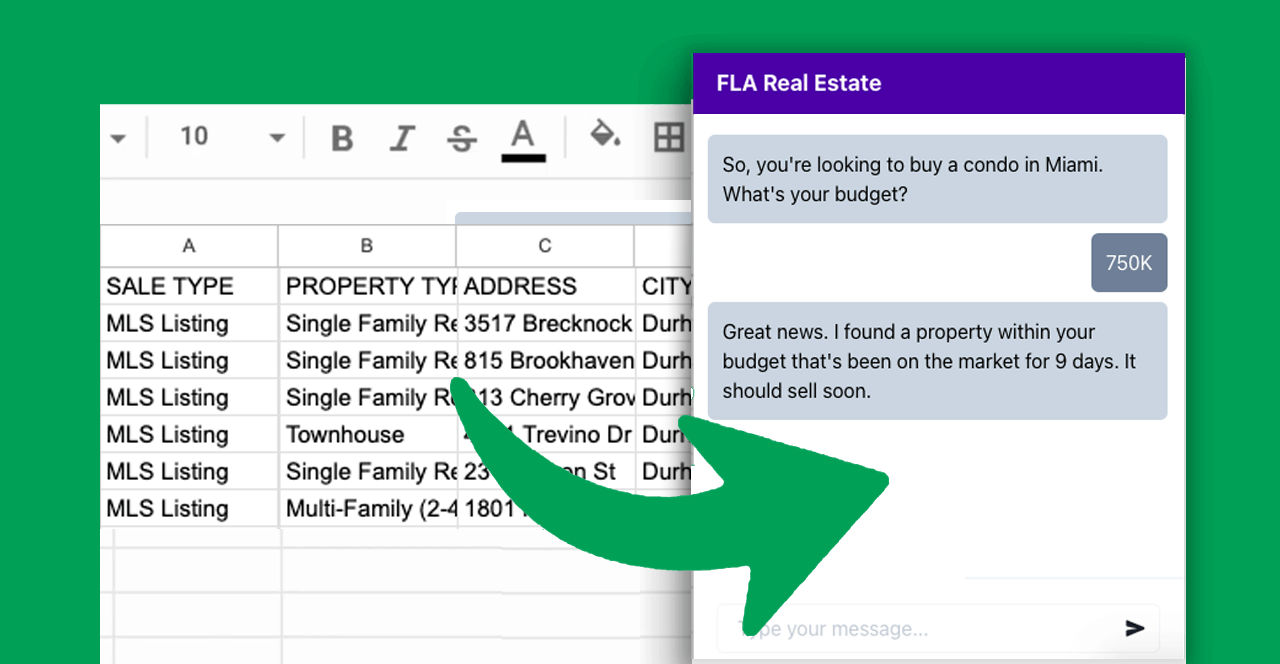
BENEFITS
You don't need to keep uploading documents to Botsheets. You just "Connect" a Google Sheet once, then add, edit, and delete cells and Botsheets keeps AI in sync with your spreadsheet while you stay in control over the data you share. If you don't want to your chatbot to generate a response with data in your sheet, just delete the cell(s) or row(s)!
You don't need to log into our dashboard to train AI. You can do it entirely from a Google Sheet. If you're an agency, just share a Google Sheet with your client and they become active participants in training AI. No learning curve or degree in computer science is needed to train AI. Every business already works with spreadsheets. Keep doing that!
Highly personalized responses are generated from data in your sheets. The more data, the more detailed and personalized the response.
The best way to train AI isn't with PDF's or scraping a website because this is unstructured data. The best way to train AI is with structured data, and spreadsheets are ubiquitous with managing structured data.
If you're using another chatbot or automation platform, using our API you'll be easily able to connect to this and use Botsheets as a database for your chatbot content.
Log in to comment and vote
Comments6
Botsheets Admin
Jan 22, 2024
It's live. When you create a bot you'll see here, but you'll also find it in Bot Settings > Data > Documents, URLs, and Google Sheets.
Gunnar Qualen
Jan 22, 2024
How can we help?
torsten mohr
Jan 16, 2024
This would be awesome
Sebastian Blanco
Jan 13, 2024
This is a great feature for cabin owners who do not want to pay commissions to Booking.com or Airbnb . Also we spend much of our time offline with no time to answer customer queries, a chatbot with this feature will be perfect. Im expecting this feature in order to help my fellows cabin owners in the area to setup this customer service bot.
Sebastian Blanco
Jan 24, 2024
I signed up for this feature and am still on a waitlist. Can you help me use this feature as soon as it's available? I can't wait to configure it and see how it works. Thanks !!
Botsheets Admin
Feb 3, 2024
It's available to everyone now